Showing posts with label explorer. Show all posts
Showing posts with label explorer. Show all posts
Sunday, April 5, 2015
Share files between Android and Windows with ES File Explorer
There was a time when the only way you could share files between your Android device and a Windows computer was by using a USB cable. These days, there are wireless options available that make it easier to share files. One such option is ES File Explorer, a powerful Android file manager. ES File Explorer helps you manage the files on your local Android device. Starting with version 3, however, LAN support was added to make it possible to share files with a Windows PC over Wi-Fi. To share files between your Android device and a Windows PC using ES File Explorer, follow the steps below:

Step 1: Create a shared folder on your Windows PC. In our example, well name it, "Android PC share." Make sure the permissions are set for read/write access.
Step 2: In ES File Explorer on your Android device, tap the globe icon in the upper-left hand corner, then navigate to Network > LAN.

Step 3: On the menu at the bottom, tap "Search" to look for available network shares on your LAN. If you dont see any, make sure that your Android device and the Windows computer are connected to the same local network and try again. If successful, you should see your Windows computer listed with its IP address.

Step 4: Tap on the icon for your Windows PC, then enter your Windows username and password.

Step 5: After your shared folder appears, you can begin sharing files back and forth using ES File Explorer.

ES File Explorer isnt the only way to share files over Wi-Fi, but its a popular utility that youre likely to have on your Android device anyway, so youd might as well give it a try.
Read more »
Step 1: Create a shared folder on your Windows PC. In our example, well name it, "Android PC share." Make sure the permissions are set for read/write access.
Step 2: In ES File Explorer on your Android device, tap the globe icon in the upper-left hand corner, then navigate to Network > LAN.
Step 3: On the menu at the bottom, tap "Search" to look for available network shares on your LAN. If you dont see any, make sure that your Android device and the Windows computer are connected to the same local network and try again. If successful, you should see your Windows computer listed with its IP address.
Step 4: Tap on the icon for your Windows PC, then enter your Windows username and password.
Step 5: After your shared folder appears, you can begin sharing files back and forth using ES File Explorer.
ES File Explorer isnt the only way to share files over Wi-Fi, but its a popular utility that youre likely to have on your Android device anyway, so youd might as well give it a try.

Friday, June 27, 2014
Root Explorer Apk v3 1 6 Android Download Paid

Whats New:
v3.1.6 update:
Included xxhdpi and xxxhdpi launcher icons.
Fixed recognition of 64GB exFAT SD cards when adding external SD card tab.
Fixed Box recurring authentication requests.
Fixed recursive search issue in KitKat when searching internal storage.
Enforce leading slash when entering external SD card path. The omission of this leading slash is what caused problems copying to SD cards for some people.
Using Root Explorer to select files for upload to web sites should now work.
v3.1.6 update:
Included xxhdpi and xxxhdpi launcher icons.
Fixed recognition of 64GB exFAT SD cards when adding external SD card tab.
Fixed Box recurring authentication requests.
Fixed recursive search issue in KitKat when searching internal storage.
Enforce leading slash when entering external SD card path. The omission of this leading slash is what caused problems copying to SD cards for some people.
Using Root Explorer to select files for upload to web sites should now work.
v3.1.6 APK FILE: HERE
v3.1.5 APK FILE: HERE
v3.1.4 APK FILE: HERE
v3.1.3 APK FILE: HERE
v3.1.5 APK FILE: HERE
v3.1.4 APK FILE: HERE
v3.1.3 APK FILE: HERE
Google Play
Features include multiple tabs, Google Drive, Box, Dropbox and network (SMB) support, SQLite database viewer, Text Editor, create and extract zip or tar/gzip files, extract rar archives, multi-select, execute scripts, search, remount, permissions, bookmarks, send files (via email, bluetooth etc), image thumbnails, APK binary XML viewer, change file owner/group, create symbolic link, "Open With" facility, MD5, create shortcuts.
SCREENSHOT
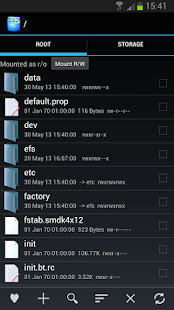
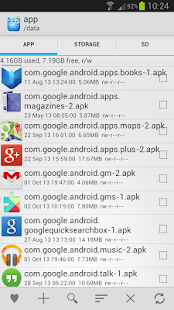
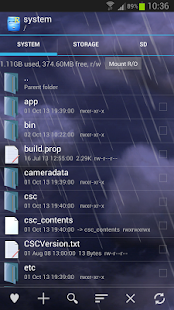
Root Explorer is the ultimate file manager for root users. Access the whole of androids file system (including the elusive data folder!).
Root Explorer v3.1.6
Size: Varies with device | Android: Varies with device
Subscribe to:
Posts (Atom)