Tuesday, August 5, 2014
New Nokia X Android pictures leak ahead of MWC unveiling
Ahead of a widely expected MWC 2014 unveiling, the heavily rumoured Nokia X Android phone has been caught on camera yet again.

Tipped to mark Nokia’s first foray into the Android smartphone scene – shortly before the company is taken over by Microsoft – the Nokia X has been the subject of multiple leaks and rumours in recent weeks, with another promotional image of the handset now making a premature appearance.
Once again surfacing courtesy of the serial, Twitter-based tipster @evleaks, the latest Nokia X picture has showcased the green bodied entry-level handset from a number of angles.
With a slightly squat, boxy design, the Nokia X handset looks set to feature a form factor markedly similar to the existing Nokia Asha 503, a budget handset for emerging markets.
Although the latest Nokia X picture leak has failed to offer any new, concrete details on the phone, recent rumours have suggested the handset will be a true entry-level offering, with a compact 4-inch display paired with a 1.2GHz dual-core processor and 512MB of RAM.
With the handset’s display mooted to support a basic 800 x 480p resolution, further Nokia X specs tipped to feature include a 5-megapixel rear-mounted camera, 4GB of internal memory and the now massive outdated Android 4.1 Jelly Bean OS.
The Nokia X is widely expected to be unveiled as the Finnish manufacturer’s first Android-powered handset during next Monday’s February 24 MWC 2014 press conference. The phone is believed to be heading for launch in a range of colours including red and green.
Read more »
Tipped to mark Nokia’s first foray into the Android smartphone scene – shortly before the company is taken over by Microsoft – the Nokia X has been the subject of multiple leaks and rumours in recent weeks, with another promotional image of the handset now making a premature appearance.
Once again surfacing courtesy of the serial, Twitter-based tipster @evleaks, the latest Nokia X picture has showcased the green bodied entry-level handset from a number of angles.
With a slightly squat, boxy design, the Nokia X handset looks set to feature a form factor markedly similar to the existing Nokia Asha 503, a budget handset for emerging markets.
Although the latest Nokia X picture leak has failed to offer any new, concrete details on the phone, recent rumours have suggested the handset will be a true entry-level offering, with a compact 4-inch display paired with a 1.2GHz dual-core processor and 512MB of RAM.
With the handset’s display mooted to support a basic 800 x 480p resolution, further Nokia X specs tipped to feature include a 5-megapixel rear-mounted camera, 4GB of internal memory and the now massive outdated Android 4.1 Jelly Bean OS.
The Nokia X is widely expected to be unveiled as the Finnish manufacturer’s first Android-powered handset during next Monday’s February 24 MWC 2014 press conference. The phone is believed to be heading for launch in a range of colours including red and green.
Smartphones tips and tricks Tablets tips and tricks Smartphones reviews
Smartphones rooting Tablets reviews News from mobile world
Smartphones rooting Tablets reviews News from mobile world

Monday, August 4, 2014
LG G Pro 2 specs leaked in AnTuTu benchmark
The LG G Pro 2 specs have leaked online in AnTuTu benchmarks, suggesting it will match the LG G2.

Ahead of an anticipated MWC 2014 arrival, the LG G Pro 2 specs have been leaked online and reveal a high-end hardware array.
In January, the first images of the LG G Pro 2 emerged online, revealing a design very similar to the LG G2. That image, coupled with the leaked benchmarks, reveal that the G Pro 2 has taken cues from the LG G2 on design and hardware.
According to the AnTuTu benchmarks, the LG G Pros 2 will have a full HD 1080p x 1920p display, which is reportedly around the 6-inch mark.
The benchmarks also suggest a 2.26GHz Qualcomm Snapdragon 800 processor, Adreno 330 graphics and 3GB of RAM, which is exactly the same as the LG G2.
The LG G Pro 2 will seemingly have 32GB of internal storage as standard and run Android 4.4 KitKat.
This is a slight upgrade from the LG G2, which offers internal storage options from 16GB and runs Android 4.2.2 Jelly Bean out of the box.
We expect the LG G Pro 2 is the smartphone the South Korean electronics giant is using to keep the flagship spot refreshed until the launch of the LG G3 later this year.
It sounds like the G Pro 2 is pretty much the larger screen, “phablet” version of the existing LG G2.
Although an MWC 2014 launch for the LG G Pro 2 has been heavily rumoured, the device may well launch earlier than that. LG recently sent out press invites for a Korean event that will take place on February 13.
LG could be attempting to beat the MWC rush, as Samsung is hotly tipped to launch the Samsung Galaxy S5 during its Samsung Unpacked 5 event on Monday, February 24.
Read more »
Ahead of an anticipated MWC 2014 arrival, the LG G Pro 2 specs have been leaked online and reveal a high-end hardware array.
In January, the first images of the LG G Pro 2 emerged online, revealing a design very similar to the LG G2. That image, coupled with the leaked benchmarks, reveal that the G Pro 2 has taken cues from the LG G2 on design and hardware.
According to the AnTuTu benchmarks, the LG G Pros 2 will have a full HD 1080p x 1920p display, which is reportedly around the 6-inch mark.
The benchmarks also suggest a 2.26GHz Qualcomm Snapdragon 800 processor, Adreno 330 graphics and 3GB of RAM, which is exactly the same as the LG G2.
The LG G Pro 2 will seemingly have 32GB of internal storage as standard and run Android 4.4 KitKat.
This is a slight upgrade from the LG G2, which offers internal storage options from 16GB and runs Android 4.2.2 Jelly Bean out of the box.
We expect the LG G Pro 2 is the smartphone the South Korean electronics giant is using to keep the flagship spot refreshed until the launch of the LG G3 later this year.
It sounds like the G Pro 2 is pretty much the larger screen, “phablet” version of the existing LG G2.
Although an MWC 2014 launch for the LG G Pro 2 has been heavily rumoured, the device may well launch earlier than that. LG recently sent out press invites for a Korean event that will take place on February 13.
LG could be attempting to beat the MWC rush, as Samsung is hotly tipped to launch the Samsung Galaxy S5 during its Samsung Unpacked 5 event on Monday, February 24.
Smartphones tips and tricks Tablets tips and tricks Smartphones reviews
Smartphones rooting Tablets reviews News from mobile world
Smartphones rooting Tablets reviews News from mobile world
Sunday, August 3, 2014
10 tips to make your phone more secure
Your smartphone is more precious than your wallet, your keys and in some cases, your actual computer when it comes to sensitive information - but we all have that nagging guilt that we dont do enough to protect our devices beyond perhaps having a four digit pass code.

Thankfully we are here to help with some top-level tips to help make your phone more secure, protecting those all important messages and images that you dont want falling into the wrong hands.
With around 314 mobiles stolen a day on the streets of London, the risk of things getting out is extremely high.
Of course if youre looking to keep your phone safe from international spies, or snooping networks, you can always check out the BlackPhone... but if youre just the average smartphone user who wants to be a little safer, follow some of our tips below.
Whether you are running iOS, Android or Windows Phone we will always advise you to grab the latest version of the OS available. This can be a little difficult with Android updates often taking a little while to go through manufacturer and network testing but is well worth it.
Part of the reason we suggest grabbing the latest OS is because it comes with all the added bonuses whether its the Control Center of iOS7 or the clear bars on Android KitKat, but also because a lot of security loopholes will have been closed.
These updates dont just pop up in major iterations either; Apple is currently pushing out iOS 7.0.6 in order to close a problem associated with using Apple devices on an unsecured network.
Most manufacturers allow you to set your phone to check for updates automatically, so always make sure this box is ticked.
It seems almost nonsensical in this day and age to not have a basic password on your lock screen, even if it is a basic one. One of the first things wed suggest is to navigate into your devices security settings and enable a pass lock.
There are obvious benefits to having even a basic lock, but whilst face lock of Android might seem fun it isnt the most secure system out there, with many Google devices rating the effectiveness of each security system so you can make an informed choice.
Pattern unlocks and pins are some of the most secure but if you can handle the hassle wed always suggest a full alphanumeric password. Also ensure that any boxes that say "make passwords visible" are also unticked.
If you want to take it one step further then wed also recommend changing your pass code regularly in case someone spots what youve typed in over your shoulder.
One of the biggest threats that could see data leaked is the less-than-humble virus. The problem isnt as widespread as on desktop computers, and if you dont download dodgy software chances are that within a 2 year contract you wont come across anything malicious, but there is still a credible threat out there.
The problem appears to be less hazardous for iPhones thanks to Apples strict controlling of the App store.
The open source nature of Android makes it a lot more vulnerable, as malicious apps can be sideloaded onto the device without being checked by Google. In both cases this is something that can be countered through the use of mobile Antivirus software.
The likes of McAfee, AVG and Lookout grace both the iOS App Store and the Google Play store for added security, but obviously be careful of any apps that seem a little suspicious.
If youre really worried check out the manufacturers website as most will come with a link to their mobile app.
Whilst it can often be a nice idea to download and install apps that arent found on the App Store or Google Play Store, these apps tend to be the ones that are less secure. Google, Apple and Microsoft, as well as the likes of BlackBerry, keep tabs on the apps that are on their app portals.
This means apps that contain malicious code are likely to have been removed before you install them.
Rooting your Android phone or jailbreaking your iPhone can also prove really dangerous, especially if you dont know what youre doing. This is because it breaks down your OS and provides you access to the basic code within and if you can get access, malicious code has a much easier route to making changes too.
If youre more familiar with the world of rooting and jailbreaking then youll have taken measures to ensure the security of your device - so make sure youre certain you know what you want when altering your handset.
One thing that can be particularly important for protecting vital messages and pictures is to add a second layer of security. If youve got a pass code that somehow manages to get into the wrong hands then all your data could potentially be at risk.
With another app you can then add another layer of security by protecting apps with a second code. Vault apps also allow you to be safe by storing all the files that you want to secure within a dedicated area of your device or on an SD card, as well as being able to wipe the data after unsuccessful log in attempts.
Samsungs new Galaxy S5 features a fingerprint scanner to hide certain parts of your phone too - it might not be the easiest thing to use, but at least you can be doubly secure that nobody can get into the places you want hidden.
Read more »
Thankfully we are here to help with some top-level tips to help make your phone more secure, protecting those all important messages and images that you dont want falling into the wrong hands.
With around 314 mobiles stolen a day on the streets of London, the risk of things getting out is extremely high.
Of course if youre looking to keep your phone safe from international spies, or snooping networks, you can always check out the BlackPhone... but if youre just the average smartphone user who wants to be a little safer, follow some of our tips below.
1. Update your software
Whether you are running iOS, Android or Windows Phone we will always advise you to grab the latest version of the OS available. This can be a little difficult with Android updates often taking a little while to go through manufacturer and network testing but is well worth it.
Part of the reason we suggest grabbing the latest OS is because it comes with all the added bonuses whether its the Control Center of iOS7 or the clear bars on Android KitKat, but also because a lot of security loopholes will have been closed.
These updates dont just pop up in major iterations either; Apple is currently pushing out iOS 7.0.6 in order to close a problem associated with using Apple devices on an unsecured network.
Most manufacturers allow you to set your phone to check for updates automatically, so always make sure this box is ticked.
2. Use a secure lock screen
It seems almost nonsensical in this day and age to not have a basic password on your lock screen, even if it is a basic one. One of the first things wed suggest is to navigate into your devices security settings and enable a pass lock.
There are obvious benefits to having even a basic lock, but whilst face lock of Android might seem fun it isnt the most secure system out there, with many Google devices rating the effectiveness of each security system so you can make an informed choice.
Pattern unlocks and pins are some of the most secure but if you can handle the hassle wed always suggest a full alphanumeric password. Also ensure that any boxes that say "make passwords visible" are also unticked.
If you want to take it one step further then wed also recommend changing your pass code regularly in case someone spots what youve typed in over your shoulder.
3. Install antivirus software
One of the biggest threats that could see data leaked is the less-than-humble virus. The problem isnt as widespread as on desktop computers, and if you dont download dodgy software chances are that within a 2 year contract you wont come across anything malicious, but there is still a credible threat out there.
The problem appears to be less hazardous for iPhones thanks to Apples strict controlling of the App store.
The open source nature of Android makes it a lot more vulnerable, as malicious apps can be sideloaded onto the device without being checked by Google. In both cases this is something that can be countered through the use of mobile Antivirus software.
The likes of McAfee, AVG and Lookout grace both the iOS App Store and the Google Play store for added security, but obviously be careful of any apps that seem a little suspicious.
If youre really worried check out the manufacturers website as most will come with a link to their mobile app.
4. Disable apps from untrusted sources and dont root or jailbreak
Whilst it can often be a nice idea to download and install apps that arent found on the App Store or Google Play Store, these apps tend to be the ones that are less secure. Google, Apple and Microsoft, as well as the likes of BlackBerry, keep tabs on the apps that are on their app portals.
This means apps that contain malicious code are likely to have been removed before you install them.
Rooting your Android phone or jailbreaking your iPhone can also prove really dangerous, especially if you dont know what youre doing. This is because it breaks down your OS and provides you access to the basic code within and if you can get access, malicious code has a much easier route to making changes too.
If youre more familiar with the world of rooting and jailbreaking then youll have taken measures to ensure the security of your device - so make sure youre certain you know what you want when altering your handset.
5. Use lock code apps and vaults
One thing that can be particularly important for protecting vital messages and pictures is to add a second layer of security. If youve got a pass code that somehow manages to get into the wrong hands then all your data could potentially be at risk.
With another app you can then add another layer of security by protecting apps with a second code. Vault apps also allow you to be safe by storing all the files that you want to secure within a dedicated area of your device or on an SD card, as well as being able to wipe the data after unsuccessful log in attempts.
Samsungs new Galaxy S5 features a fingerprint scanner to hide certain parts of your phone too - it might not be the easiest thing to use, but at least you can be doubly secure that nobody can get into the places you want hidden.
Smartphones tips and tricks Tablets tips and tricks Smartphones reviews
Smartphones rooting Tablets reviews News from mobile world
Smartphones rooting Tablets reviews News from mobile world
Saturday, August 2, 2014
Moto X tipped for July 11 launch date
The Moto X Phone has been tipped for a July 11 launch date, according to one technology broadcaster.

Leo Laporte, an award-winning American tech broadcaster and author, has said he has been invited to a Motorola event on July 10 and 11.
Invited by a new Motorola employee called Guy Kawasaki, Laporte said what is being featured at the event is still being kept quiet, but will only be for selected tech journalists.
Rumours surrounding the long-awaited Moto X Phone from Motorola seem to be coming in thick and fast now, especially as the suggest launch day is now just under a week away.
With the Moto X the first significant launch since Google bought Motorola in 2011, many expect the smartphone to be rather special.
However, the latest leaks suggest it won’t be a powerhouse device in terms of specs, but rather focusing on new software technologies.
The Moto X ad campaign that launched this week just prior to the American Independence Day revealed that Motorola is marketing its upcoming Android device as the smartphone “you can design yourself.”
Although no further details have yet been revealed, it is expected that consumers will be able to design their own case, using something like a basic Google Nexus 4 as an outline.
“The first smartphone designed, engineered and assembled in the USA is coming,” reads the Moto X news sign up page. “It’s also the first smartphone that you can design yourself. Because today you should have the freedom to design the things in your life to be as unique as you are.”
Specs-wise the Moto X is tipped to pack a 4.7-inch 1280 x 768p resolution display, powered by a Qualcomm Snapdragon 800 CPU.
As for a Moto X release date, Motorola has only given the rather frustrating “coming soon”, but we expect that further details, including the device’s new software, will be revealed on July 11.
Read more »
Leo Laporte, an award-winning American tech broadcaster and author, has said he has been invited to a Motorola event on July 10 and 11.
Invited by a new Motorola employee called Guy Kawasaki, Laporte said what is being featured at the event is still being kept quiet, but will only be for selected tech journalists.
Rumours surrounding the long-awaited Moto X Phone from Motorola seem to be coming in thick and fast now, especially as the suggest launch day is now just under a week away.
With the Moto X the first significant launch since Google bought Motorola in 2011, many expect the smartphone to be rather special.
However, the latest leaks suggest it won’t be a powerhouse device in terms of specs, but rather focusing on new software technologies.
The Moto X ad campaign that launched this week just prior to the American Independence Day revealed that Motorola is marketing its upcoming Android device as the smartphone “you can design yourself.”
Although no further details have yet been revealed, it is expected that consumers will be able to design their own case, using something like a basic Google Nexus 4 as an outline.
“The first smartphone designed, engineered and assembled in the USA is coming,” reads the Moto X news sign up page. “It’s also the first smartphone that you can design yourself. Because today you should have the freedom to design the things in your life to be as unique as you are.”
Specs-wise the Moto X is tipped to pack a 4.7-inch 1280 x 768p resolution display, powered by a Qualcomm Snapdragon 800 CPU.
As for a Moto X release date, Motorola has only given the rather frustrating “coming soon”, but we expect that further details, including the device’s new software, will be revealed on July 11.
Friday, August 1, 2014
Buka HD Working v3 1 0 Paid Apk

Google Play
Download Buka HD full version apk file Below:
v3.1.0 APK FILE: HERE or HERE
Protect her with powerful explosions and shockwaves you can create with single touch. Use shockwaves to push objects closer or away.
Destroy everything in your path and navigate through the rest - until you reach The Happy Place!
SCREENSHOT


Tags: buka hd apk, buka hd apk full version, buka hd apk android, buka hd apk download, buka hd apk paid, buka hd apk free
Destroy everything in your path and navigate through the rest - until you reach The Happy Place!
SCREENSHOT
Tags: buka hd apk, buka hd apk full version, buka hd apk android, buka hd apk download, buka hd apk paid, buka hd apk free
BUKA is a cute game of skill. Facing the impossible odds of countless baddies, BUKA has set on a quest to find The Happy Place.
Buka HD v3.1.0 APK
Size: 6.8 Mb | Android: 2.3 and up
Thursday, July 31, 2014
Why is Microsoft trying to smuggle Windows into your Android phone
For more than two decades, ever since DOS and Windows 3.1x, dual-booting has been restricted to hardcore enthusiasts who found being able to boot from one or more operating systems convenient and useful.

If the presentation by Microsofts Joe Belfiore last week in Barcelona is an indication of how the mobile market will evolve, were about to see a comeback of dual booting with Android and Windows Phone sitting on the same phone.
The push is likely to come from Microsoft for whom this might be one of the biggest punts of its long history, similar to putting Internet Explorer into Windows 95.
The gist of the later part of Belfiores presentation is that Microsoft is working closely with hardware partners to make sure that there is little or no change needed to get a smartphone (or indeed any ARM-based devices) to run Windows Phone or Android.
X86 devices like PCs, laptops and servers run Windows or Linux (or indeed MacOS X) indiscriminately and theres no reason why that shouldnt be the case for smartphones in general.
This is a logical step that is likely to be more helpful to Microsoft than Android - and this tacit agreement will end up being most detrimental to Apple.
It seems likely that Microsoft may encourage partners to offer dual-boot as standard on all Android smartphones by offering Windows Phone for free or for a huge discount.
The cynical among us might suggest that as well as offering Windows Phone for free (or at a low cost), Microsoft will slash the fees associated with cross licensing agreements signed with scores of manufacturers of Android devices to persuade them to put Windows Phone prominently on the Android phone (perhaps on the boot screen).
Either solution will cost money but would enable Microsoft to get Windows into the hands of potentially tens of millions of Android users.
It will hope that they will try Windows Phone and be so enamoured of it that they eventually switch to a solely Windows Phone device or continue to use the two platforms altogether.
This would help Microsoft expand the number of smartphones running Windows Phone exponentially and we might even see Microsoft-backed versions of Android without Googles services (similar to what Nokia is doing), something which would be something of an ironic move.
As always though, the more competition in a market, the more likely innovation will thrive.
So whats the point of dual-booting for consumers? Most end-users and consumers are unlikely to gain much from the exercise, depending on how dual-booting devices are pitched to the mainstream.
But there is a category of users for whom this will be a godsend and that is the business/enterprise audience.
Having Windows 8 Embedded or Windows Phone 8 plus Android on a sleek smartphone that can be used both for work and leisure will be an attractive proposal to some.
Microsofts mobile platform offers easy access to Office 365, Active Directory and the entire Windows ecosystem (including Xbox) and is an incredibly attractive alternative to BlackBerry.
Thats the theory many think Redmond will follow because the other option is to see Windows Phone stuck as the third choice after Android and iOS, and seeing numbers of shipped (but not sold) units increase over time.
Piggy-backing on Googles Android is definitely not an ego-boosting move for Microsoft but it is by far the most pragmatic.
It is also one that can yield great results reasonably quickly, which is what Satya Nadella needs at the moment to stamp his authority on the company.
Read more »
If the presentation by Microsofts Joe Belfiore last week in Barcelona is an indication of how the mobile market will evolve, were about to see a comeback of dual booting with Android and Windows Phone sitting on the same phone.
The push is likely to come from Microsoft for whom this might be one of the biggest punts of its long history, similar to putting Internet Explorer into Windows 95.
The enemy of my enemy is my friend
The gist of the later part of Belfiores presentation is that Microsoft is working closely with hardware partners to make sure that there is little or no change needed to get a smartphone (or indeed any ARM-based devices) to run Windows Phone or Android.
X86 devices like PCs, laptops and servers run Windows or Linux (or indeed MacOS X) indiscriminately and theres no reason why that shouldnt be the case for smartphones in general.
This is a logical step that is likely to be more helpful to Microsoft than Android - and this tacit agreement will end up being most detrimental to Apple.
How bold is too bold?
It seems likely that Microsoft may encourage partners to offer dual-boot as standard on all Android smartphones by offering Windows Phone for free or for a huge discount.
The cynical among us might suggest that as well as offering Windows Phone for free (or at a low cost), Microsoft will slash the fees associated with cross licensing agreements signed with scores of manufacturers of Android devices to persuade them to put Windows Phone prominently on the Android phone (perhaps on the boot screen).
Either solution will cost money but would enable Microsoft to get Windows into the hands of potentially tens of millions of Android users.
It will hope that they will try Windows Phone and be so enamoured of it that they eventually switch to a solely Windows Phone device or continue to use the two platforms altogether.
This would help Microsoft expand the number of smartphones running Windows Phone exponentially and we might even see Microsoft-backed versions of Android without Googles services (similar to what Nokia is doing), something which would be something of an ironic move.
As always though, the more competition in a market, the more likely innovation will thrive.
The business allure of dual-booting
So whats the point of dual-booting for consumers? Most end-users and consumers are unlikely to gain much from the exercise, depending on how dual-booting devices are pitched to the mainstream.
But there is a category of users for whom this will be a godsend and that is the business/enterprise audience.
Having Windows 8 Embedded or Windows Phone 8 plus Android on a sleek smartphone that can be used both for work and leisure will be an attractive proposal to some.
Microsofts mobile platform offers easy access to Office 365, Active Directory and the entire Windows ecosystem (including Xbox) and is an incredibly attractive alternative to BlackBerry.
Thats the theory many think Redmond will follow because the other option is to see Windows Phone stuck as the third choice after Android and iOS, and seeing numbers of shipped (but not sold) units increase over time.
Piggy-backing on Googles Android is definitely not an ego-boosting move for Microsoft but it is by far the most pragmatic.
It is also one that can yield great results reasonably quickly, which is what Satya Nadella needs at the moment to stamp his authority on the company.
Smartphones tips and tricks Tablets tips and tricks Smartphones reviews
Smartphones rooting Tablets reviews News from mobile world
Smartphones rooting Tablets reviews News from mobile world
Wednesday, July 30, 2014
Injustice Gods Among Us Apk v1 3 3 Data Unlimited Money Working Version

MASSIVE ROSTER:
Collect and play as your favorite DC Comics icons such as Batman, Green Arrow, Cyborg, Harley Quinn, Nightwing, Superman, The Flash, Wonder Woman, Green Lantern and many others. With each alternate version of these iconic characters you get a new set of moves and a whole new fight.
AMAZING GRAPHICS:
Delivers next-gen graphics on your phone or tablet, with custom animations for every single hero and villain. Take the battle to Arkham Asylum, the Batcave, and other iconic locales from DC Comics, fully rendered in 3D.
LEVEL UP:
Build your move set, increase your powers and beat your competition. Constantly evolve your roster to fit your style of play and put your best team forward as you take on a series of combatants.
FIGHT:
Use the touch screen mechanics of your Android devices to battle your enemies in 3 on 3 combat. Swipe and tap to perform combos and build your power to pull off special attacks and super moves taken straight from the console version of the game.
Instructions:
Install apk.
Extract and copy com.wb.goog.injustice map into /sdcard/Android/obb/ COPY HERE
It should look like this /sdcard/Android/obb/com.wb.goog.injustice
Launch the game.
Install apk.
Extract and copy com.wb.goog.injustice map into /sdcard/Android/obb/ COPY HERE
It should look like this /sdcard/Android/obb/com.wb.goog.injustice
Launch the game.
If you dont know which GPU (Graphics Processing Unit) uses your device, Install this APK and check GPU Renderer information.
Google Play
DOWNLOAD FULL VERSION APK + DATA FILES BELOW:
v1.3.3 Download DATA Obb File from Userfiles: HERE
v1.3.3 APK File for Tegra devices from Solidfiles: HERE | from BillionUploads: HERE
v1.3.3 APK File for Mali devices from Solidfiles: HERE | from BillionUploads: HERE
v1.3.3 APK File for Adreno devices from Solidfiles: HERE | from BillionUploads: HERE
v1.3.3 APK File for PowerVR devices from Solidfiles: HERE | from BillionUploads: HERE
NOTE!! This data file have been tested only on Tegra device so it might not work on your Device.
And Remember you wont be able to log-in to your in game google profile.

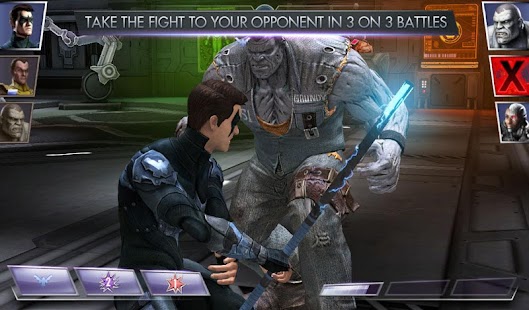

INJUSTICE: GODS AMONG US is a free to play collectible card game that allows you to build a roster of playable characters, moves and powers and enter the arena in touch based 3 on 3 combat.
Injustice: Gods Among Us v1.3.3
Size: Varies with device | Android: 4.0 and up
Subscribe to:
Posts (Atom)