Showing posts with label mobile. Show all posts
Showing posts with label mobile. Show all posts
Thursday, April 2, 2015
5 Android Apps to Turn Your Phone Into a Mobile Document Scanner
Your Android smartphone has all the photographic and processing power youll need to snap up those docs and get them into the cloud where they belong.
Here are a few mobile document scanning solutions we put through their paces.

Read more »
Here are a few mobile document scanning solutions we put through their paces.
1. CamScanner
CamScanner is a breeze to use, and you can test out the free version via the Market link above. Snap a photo of your document and pull up the cropping tool. The app will auto-detect the edges of the paper, but the slick drag-and-snap guides will help you fine tune the dimensions.
The processing enhancements are smart, and will compensate for low light and bad focus reasonably well. Though the app generates a cropped and toned image, it will also hang onto the original photo -- handy, in case you accidentally cropped your boss name off the letterhead.
The app has built-in integration with Google Docs, Box.net and Dropbox, but for the less fancy among you, its easy to pipe scanned docs straight into email.
The main issue we encountered was with PDF creation. The original image is stored as a JPEG, but the option to convert it to a PDF simply opened the phones default PDF viewer. The file is viewable, but we found no apparent way to save or share.
The paid version promises to make things easier in this department, but you should see how the free version performs on your device before purchasing.
Price: Free / $4.99 for full license and features
2. Document Scanner
This app scans directly to PDF with ease. The interface couldnt be cleaner, and while the cropping tools arent as snazzy as CamScanners, they get the job done.
There are image enhancement features, but in our testing, they werent as precise as CamScanners.
Document Scanner also lets you upload directly to Google Docs, DropBox, and Box.net. It even has Evernote integration -- a nice touch. Scan multiple pages in succession and email them to your hearts content.
The trial version will only last you seven days, but that should give you the time to decide if youre ready to throw down four bucks on the real deal.
Price: Free / $3.98 for full version
3. Droid Scan Pro PDF
Droid Scan works similarly to the aforementioned apps with one exception -- itll send you out to the system camera to grab the image. No big deal -- in reality, the other apps are simply wrapping the native camera with their interface.
Once youre done shooting, Droid Scan picks right back up where you left off and gets down to image processing quickly.
The app has smart edge detection, intuitive (if small) color and contrast controls, and a final menu that lets you select the docs you want to save down as either JPEGs or PDFs (though PDF functionality is only available in the paid version).
Price: Free / $4.99 for PDF functionality
4. Scan to PDF
Scan to PDF scores big on interface simplicity. Its easy to start scanning or adjust the settings right from the first screen.
The app jumps over to the system camera by default (though you can adjust this setting), and offers great image processing and enhancement, even in low light.
The cropping function is intuitive but can be awkward -- rather than dragging and snapping at the corners, youll have to pull the edges. Occasionally, your fingers will run out of screen or theyll accidentally drag the entire frame away from the edge. However, This quirk is far from a deal breaker, and the excellent gallery viewer more than makes up for it.
The free version of Scan to PDF does it all, but if you like it and use it regularly, you can show the devs a little love with a $.99 upgrade.
Price: Free / $.99 optional purchase for a job well done
5. PDF Scanner
For those looking for the dead-simple option, PDF Scanner is the way to go. This no-frills app cuts right to the quick.
Add pages by hitting scan. The camera viewfinder that appears has no buttons, so youll have to just tap the screen to focus and snap.
The camera makes use of your phones flash, which is helpful when scanning in low light. But be sure to frame and focus your image carefully because theres no crop or image enhancement here. Snap away until your document is complete, then email the PDF to its destination.
Regrettably, theres not trial version of this app, but if youre looking for a way to generate PDF scans quickly and easily, have no qualms dropping your coin here.
Price: $1.99

Saturday, September 6, 2014
Mobile Doc Scanner MDScan Working v2 0 47 Apk Files

Mobile Doc Scanner (MDScan) Apk v2.0.47 Paid
With MDScan users are free to scan any type of document, ranging from receipts to text pages and almost everything in between, on the go anywhere and anytime.
A perfect companion for busy users, MDScan allows anyone to transform everything from invoices to whiteboards and classes notes, magazine articles and more into a PDF format in order to easily export them, share and e-mail it to others, or for any other reason they can come up with. MDScan automatically detects borders, corrects distortion, and equalizes brightness to create clear, legible documents at a very high speed for your convenience.
A perfect companion for busy users, MDScan allows anyone to transform everything from invoices to whiteboards and classes notes, magazine articles and more into a PDF format in order to easily export them, share and e-mail it to others, or for any other reason they can come up with. MDScan automatically detects borders, corrects distortion, and equalizes brightness to create clear, legible documents at a very high speed for your convenience.
More info and Screenshots from Google Play
DOWNLOAD from UploadRocket

DOWNLOAD from Zippyshare
Tags: Mobile Doc Scanner (MDScan) apk, Mobile Doc Scanner (MDScan) apk download, Mobile Doc Scanner (MDScan) apk full version, Mobile Doc Scanner (MDScan) android apk
Tags: Mobile Doc Scanner (MDScan) apk, Mobile Doc Scanner (MDScan) apk download, Mobile Doc Scanner (MDScan) apk full version, Mobile Doc Scanner (MDScan) android apk
Sunday, July 13, 2014
FL Studio Mobile Apk v1 2 2 Full Download

You can even load the FL Studio Mobile projects into the FL Studio Desktop PC version* and take them to the next level.
If it’s a beat on the step sequencer, a melody on the piano roll or a full song on the playlist, FL Studio Mobile has you covered. Never lose that idea again. Get it down and happening wherever you are.
If it’s a beat on the step sequencer, a melody on the piano roll or a full song on the playlist, FL Studio Mobile has you covered. Never lose that idea again. Get it down and happening wherever you are.
Whats New:
Bug fixes in version 1.2.2
Fixes black borders on some 720p devices.
Fixes a crash that occurred on certain devices when launching the app.
Fixes an issue related to creating instruments from zip files.
Instructions:
Install apk.
Extract and copy com.imageline.FLM map into /sdcard/Android/obb/ COPY HERE
It should look like this /sdcard/Android/obb/com.imageline.FLM
Launch the game.
Install apk.
Extract and copy com.imageline.FLM map into /sdcard/Android/obb/ COPY HERE
It should look like this /sdcard/Android/obb/com.imageline.FLM
Launch the game.
Google Play
v1.2.2 Apk + Data Obb files Download from Userfiles: HERE
v1.2.2 Apk + Data Obb files Download from Zippyshare Below:
FL Studio Mobile full version apk + data files download Below:
v1.2.2 Apk + Data Obb files Download from Solidfiles: HEREv1.2.2 Apk + Data Obb files Download from Userfiles: HERE
v1.2.2 Apk + Data Obb files Download from Zippyshare Below:
PART 1 | PART 2
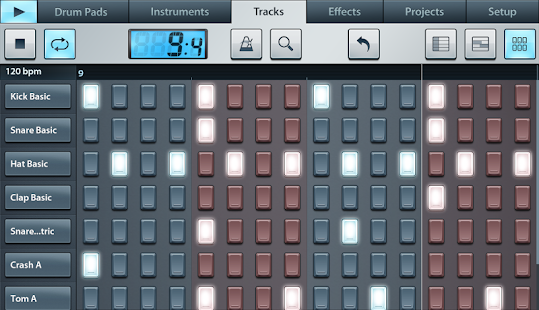

FL Studio Mobile allows you to create and save complete multi-track music projects on your Android phone or tablet device.
FL Studio Mobile v1.2.2
Size: 218 Mb | Android: 2.3.3 and up
Monday, June 30, 2014
Apple reportedly planning launch of own mobile payment system
Apple is said to be working on plans to launch its own mobile payment system, a move that would allow users to purchase goods and services using their Apple ID accounts.

Read more »
With the Cupertino-based company said to be laying the groundwork for a mobile payment service launch, the Wall Street Journal has claimed that Apple will look to capitalise on the millions of existing iPhone and iPad users that already store their credit card details with the company.
With Apple said to be in discussions with additional technology companies and retailers over the proposed introduction of its mobile payment system, it has been suggested that the account that lets users seamlessly purchase apps, music and books from iTunes could be adapted to pay for in-store items.
If launched, the Apple mobile payment system would see users able to charge high street shopping trips or services such as a car MOT or eye test to their Apple ID account.
Highlighting the company’s high level of intent, it has been reported that Apple CEO Tim Cook has assigned the company’s Senior Vice President of Internet Software and Services, Eddy Cue to the project.
There is currently no word as to when Apple could be planning to roll out its mobile payment service, or if it will be exclusive to US residents at launch or be on the receiving end of a wider global release.
Saturday, May 31, 2014
PAYG 4GEE Mobile Broadband unveiled
EE has launched the first Pay As You Go 4GEE Mobile Broadband tariffs, allowing simplified super fast broadband payments.

Super fast mobile 4G broadband can now be accessed on a PAYG basis with the new tablet and smartphone plans from EE.
“PAYG 4GEE Mobile Broadband means you can get superfast 4GEE internet access on your tablet or laptop whenever you like - and only pay as you use it", explains EE in a statement.
A PAYG 4G SIM can be purchased for £15 with 2GB of data pre-loaded for 30 days of use.
“A great way to enjoy superfast 4GEE on your tablet or laptop is with a Mobile Wi-FI device - like the Alcatel Y800 which comes pre-loaded with 3GB worth of data. It’s like being surrounded by your own travelling ‘bubble of 4G’.”
The Alcatel L800 UB dongle is priced at £50 with that 2GB of data and will last for 30 days. When purchased, the user can also sign up for an additional 6GB of data for the same price at a 2GB bundle.
The PAYG Mobile Wi-Fi device, the Alcatel Y800 Mobile, also comes with 2GB of data for a £70 one-off fee. As with the dongle, a 6GB data bundle can be purchased for the 2GB bundle price.
Users can top up by the day or the month. It’s £3 per day for an additional 500MB of data. Extra monthly allowances cost £15 for 2GB, £20 for 4GB and £30 for 10GB of data.
The 4G PAYG tariffs are available starting from today, alongside the newly launched double speed 4G connections across twelve British cities.
Read more »
Super fast mobile 4G broadband can now be accessed on a PAYG basis with the new tablet and smartphone plans from EE.
“PAYG 4GEE Mobile Broadband means you can get superfast 4GEE internet access on your tablet or laptop whenever you like - and only pay as you use it", explains EE in a statement.
A PAYG 4G SIM can be purchased for £15 with 2GB of data pre-loaded for 30 days of use.
“A great way to enjoy superfast 4GEE on your tablet or laptop is with a Mobile Wi-FI device - like the Alcatel Y800 which comes pre-loaded with 3GB worth of data. It’s like being surrounded by your own travelling ‘bubble of 4G’.”
The Alcatel L800 UB dongle is priced at £50 with that 2GB of data and will last for 30 days. When purchased, the user can also sign up for an additional 6GB of data for the same price at a 2GB bundle.
The PAYG Mobile Wi-Fi device, the Alcatel Y800 Mobile, also comes with 2GB of data for a £70 one-off fee. As with the dongle, a 6GB data bundle can be purchased for the 2GB bundle price.
Users can top up by the day or the month. It’s £3 per day for an additional 500MB of data. Extra monthly allowances cost £15 for 2GB, £20 for 4GB and £30 for 10GB of data.
The 4G PAYG tariffs are available starting from today, alongside the newly launched double speed 4G connections across twelve British cities.
Monday, May 19, 2014
LG Windows Phone 8 mobile in the works
LG is working on a phone that runs the Windows Phone 8 operating system, with the handset currently at R&D phase.

According to Indian website Lightreading.in, LG is in the process of making its first Windows Phone 8 mobile.
LG India MD Soon H Kwon says that “we are actually working on our Windows Phone 8 OS powered smartphone,” although had no specific release plans to share about the device.
Although LG produced one of the first Windows Phone 7 mobiles, in the shape of the LG Optimus 7, this phone – if released – will be the first Windows Phone 8 handset to come from the company.
Kwon explained the company’s renewed interest in the Microsoft platform, saying “we believe that Windows will pick up going ahead, as Microsoft is pumping efforts into it.”
Reports on the future of Windows Phone vary wildly depending on where you look, though.
A Canalys report released in June 2013 suggests that Windows Phone will have a fairly healthy 12.7 per cent share of the mobile market by 2017. However, the latest figures show Windows Phone’s share shrinking.
Recent comScore stats analysing US mobile market share drop from 3.2 per cent to just 3 per cent between Q1 2013 and Q2 2013 – from bad to (slightly) worse.
To date, the highest-profile Windows Phone devices have come from Nokia. Its Lumia-series mobiles such as the Lumia 925 and Lumia 800 have been given far greater marketing support than any other Windows Phone handsets.
Although LG is considered a diminishing star in the mobile firmament by some, its production of the Google Nexus 4 has actually seen its market share rise in the last year.
It mobile market share in Q1 2013 was 4.9 per cent, up from 3.2 per cent in Q1 2012. However, Kantar Worldpanel ComTech says LG’s increase in share is “almost solely driven” by the Nexus 4.
The most obvious issue – the Google Nexus 4 is not universally recognised as an ‘LG’ phone.
Google’s next phone was initially expected to be made by Motorola, the mobile arm of which was bought by Google in 2012.
However, reports surfacing as recently as a month ago suggest LG will be behind the Google Nexus 5. Perhaps LG’s mobile fortunes are set to continue.
Read more »
According to Indian website Lightreading.in, LG is in the process of making its first Windows Phone 8 mobile.
LG India MD Soon H Kwon says that “we are actually working on our Windows Phone 8 OS powered smartphone,” although had no specific release plans to share about the device.
Although LG produced one of the first Windows Phone 7 mobiles, in the shape of the LG Optimus 7, this phone – if released – will be the first Windows Phone 8 handset to come from the company.
Kwon explained the company’s renewed interest in the Microsoft platform, saying “we believe that Windows will pick up going ahead, as Microsoft is pumping efforts into it.”
The future of Windows Phone 8
Reports on the future of Windows Phone vary wildly depending on where you look, though.
A Canalys report released in June 2013 suggests that Windows Phone will have a fairly healthy 12.7 per cent share of the mobile market by 2017. However, the latest figures show Windows Phone’s share shrinking.
Recent comScore stats analysing US mobile market share drop from 3.2 per cent to just 3 per cent between Q1 2013 and Q2 2013 – from bad to (slightly) worse.
To date, the highest-profile Windows Phone devices have come from Nokia. Its Lumia-series mobiles such as the Lumia 925 and Lumia 800 have been given far greater marketing support than any other Windows Phone handsets.
LG Phones
Although LG is considered a diminishing star in the mobile firmament by some, its production of the Google Nexus 4 has actually seen its market share rise in the last year.
It mobile market share in Q1 2013 was 4.9 per cent, up from 3.2 per cent in Q1 2012. However, Kantar Worldpanel ComTech says LG’s increase in share is “almost solely driven” by the Nexus 4.
The most obvious issue – the Google Nexus 4 is not universally recognised as an ‘LG’ phone.
Google’s next phone was initially expected to be made by Motorola, the mobile arm of which was bought by Google in 2012.
However, reports surfacing as recently as a month ago suggest LG will be behind the Google Nexus 5. Perhaps LG’s mobile fortunes are set to continue.
Thursday, May 15, 2014
Now youll never get any sleep! Pillow doubles up as a CHARGER so your mobile and tablet never loses power
If you just cant be without your phone or tablet, even when youre in bed, a pair of Canadian inventors have created a pillow that doubles up as a charger.

Read more »
The Power Pillow comes with two portable batteries, and each battery is fitted with two USB ports capable of charging a phone and tablet at the same time.
Its makers claim each battery will charge an iPhone six times before it runs out of power, but will need to be charged for 10 hours to reach full capacity again.
The Power Pillow is aimed at people who watch films or TV, check emails, or read on their tablets and Kindles in bed.
It is the brainchild of Canadian inventor Geoff Martin who came up with the idea when he was speaking to his brother on the phone in bed and his battery ran out.
He started working on the project with his partner Lisa Sutt and they created various designs and prototypes.
The pair has now launched a campaign on Kickstarter and is hoping to raise $30,000 (£18,200) to fund the device.
The pillow is being sold for $79 (£48) for a pillow and one battery.
People who donate $124 (£76) will be sent a cushion, two batteries, and two micro USB cables.
Lisa, 37, from Nova Scotia in Canada, said: ‘Geoff and I were relaxing in bed when his brother Frank called: While he was on the phone with his brother he blurted out "why not have a pillow that you can directly connect your phone to for charging."
‘I was sitting next to him on the bed working on my laptop and thought it was a good idea, and we immediately started working on the Power Pillow.
‘We have gone through dozens of design drawings, dozens of batteries and over a dozen prototypes.’
The charging system comes with two 12000mAh battery packs, one is kept in the pillow along with a charging USB cable.
The other pack is charged separately via a wall plug.
When one battery dies, it can be replaced with the fully-charged pack so the pillow is never without charge.
Alternatively, the second battery can be carried in a bag or pocket and used to charge a device when out of the house.
Each lithium polymer battery in the pillow is lined with ExStatic fabric made with carbon nanotubes to offer protection against the voltage. They are also cased in a battery pack.
‘In a nut shell, Power Pillow will make running to an outlet a thing of the past,‘ continued Sutt.
‘Even with one per cent battery left on your phone, by simply plugging into the Power Pillow right beside you, you will extend your call for literally hours. The same goes for watching movies and playing games.’
Subscribe to:
Posts (Atom)